
This guide covers how it works, who it fits, what you should and should not automate, and how to calculate the payoff before you build anything.
Answer in seconds instead of hours: connect a business bot to your Telegram account in Botconsole, with no code and no second phone.
1. Customers Write When You Are Busy
The pattern repeats for almost everyone selling through Telegram:
- the message arrives in the evening, on a weekend, or in the middle of other work;
- it gets buried between friends, family chats, and work groups;
- you reply three hours later, and the customer has already messaged three competitors and picked the fastest one;
- the same questions arrive every day: how much, are you open today, do you have it in stock;
- you answer them manually, over and over, between other tasks.
This is not a discipline problem. Personal Telegram was never built for inbound demand: there is no queue, no status, no reminder, and no line between "customer" and "everyone else."
You can now attach a business bot to a regular Telegram account. It reads the messages you allow it to see, replies to customers on your behalf, and performs the actions you configure.
💡 Read also: No-Code Bot Builder: How to Create a Bot Without Code — Learn how to build and launch a bot without writing code • 6 mins read
2. What a Telegram Business Bot Actually Is
A business bot is a digital assistant connected to a normal Telegram account. Telegram calls the underlying capability Secretary Mode, and it belongs to the messenger's business feature set.
Nothing changes for the customer:
- they do not need to find a separate bot or subscribe to it;
- they do not press
/start; - the conversation stays in the ordinary private chat where they wrote to you;
- the reply arrives from your account, not from a bot account.
What changes for you is the part that matters. You see the whole conversation and can step in at any moment. The second you type a reply yourself, the bot goes quiet in that chat.
3. Business Bot vs. Regular Telegram Bot
| Regular Telegram bot | Business bot |
|---|---|
| Has its own account | Connects to the owner's account |
| The customer must open the bot and press Start | The customer messages the owner directly |
| Replies as the bot | Replies as the account owner |
| Reads as automation | Reads as a normal conversation with a business |
| Conversations live in the bot | Conversations stay in the owner's account |
| A human has to be brought into the chat | The owner just keeps typing, right in Telegram |
| Commands, menus, and buttons work | Logic is built on message text |
| Broadcasts allowed | Broadcasts not allowed |
The distinction comes down to one line:
A regular bot is a channel of its own. A business bot is an assistant inside a channel you already have.
The two coexist. The same bot can run its own conversations with its main scenario while answering your private chats with a separate business scenario.
4. What Businesses Get Out of It
No lost inbound
The bot replies while you are driving, in a meeting, on vacation, or asleep. The customer hears back at the moment they are still choosing.
Faster message-to-lead conversion
Instead of "we'll get back to you shortly," the bot asks what you would have asked anyway: what they need, where they are, timeline, budget, how to reach them. You get a filled-in lead instead of a bare "hi."
Less repeated work
Pricing, hours, address, delivery terms, availability, payment options. These questions recur daily and need none of your attention.
Round-the-clock coverage
Overnight and on weekends the bot advises, collects details, and takes preliminary requests. In the morning you work a prepared queue instead of a pile of missed messages.
Order in your inbox
Contacts and conversation history land in a CRM. You can see who wrote, about what, where the conversation stalled, and who needs a call back.
Shorter response time
Customers rarely message only you. They message three or five vendors at once and continue with whoever answers first. Speed to lead decides more deals than polish does.
🧩 Use a ready-made free template: AI-powered sales support bot — Answer product questions instantly and turn more chats into sales • New template
Scale without hiring
One bot holds dozens of conversations at the same time and escalates only what genuinely needs a person: complex quotes, negotiation, edge cases.
5. What Freelancers and Solo Professionals Get
A one-person business has no second shift, which is why automating the first reply pays off most here.
🧩 Use a ready-made free template: Telegram Lead generation bot — Qualify prospects automatically and receive better-prepared leads • New template
A business bot can:
- answer questions about pricing and how you work;
- share your portfolio and relevant examples;
- collect a description of the task and accept files;
- clarify budget and deadlines;
- check whether the request is a fit at all: niche, scope, region;
- offer times for a call;
- answer clients in other time zones;
- remind you about requests worth your attention.
While a designer is deep in a project, the business bot answers a new client, asks about the type of work, timeline, and budget, receives the files, and produces a prepared request. The designer opens Telegram once that evening and finds a brief instead of a "hello."
6. Where It Fits Best
| Business | What the bot can do |
|---|---|
| Salon | Clarify the service and book the client |
| Clinic | Collect intake details and offer available times |
| Online store | Check availability, advise, and take the order |
| Real estate agent | Clarify budget, area, and property requirements |
| Auto repair shop | Collect vehicle details and the problem |
| Travel agency | Ask about destination, dates, and party size |
| Online school | Explain programs and qualify students |
| Agency | Capture the brief, budget, and timeline |
| Consultant | Answer common questions and schedule a call |
| Support team | Find answers in the knowledge base and open tickets |
Every row shares one trait: the first three or four turns of the conversation are almost always identical.
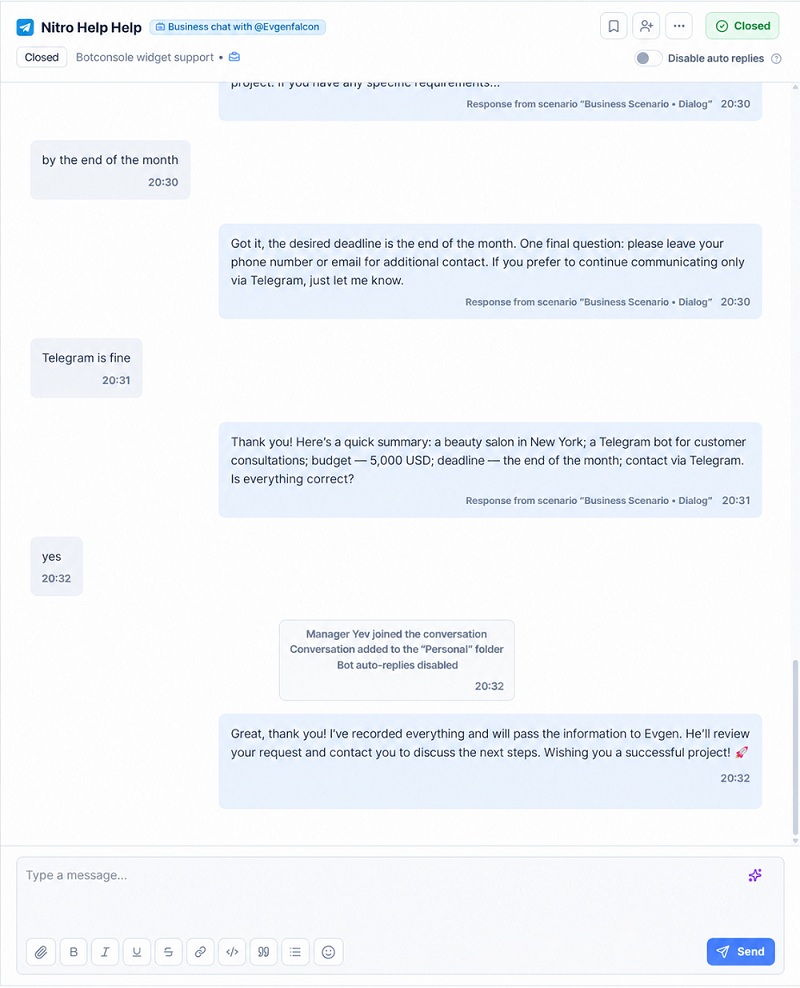
7. What a Conversation Looks Like
Customer:
How much does an online store cost to build?
Business bot (sent from your account):
It depends on the size of your catalog and the features you need. Do you already have a site, or are we building from scratch?
From there the bot:
- Clarifies the task: what you sell, how many products, whether inventory sync is needed.
- Asks about timeline and budget range.
- Requests contacts or files: a spec, a link to the current site, examples.
- Saves the lead in the CRM and applies tags.
- Sends you a short summary of the conversation.
- Hands the dialog over to a human.
The point is not the fast reply by itself. You get a qualified request you can act on immediately.
8. What You Can Automate
Basic automation
- welcome message;
- answers to frequent questions;
- contact capture;
- sending a price list or deck;
- business hours notice.
Scenario automation
- intake forms and briefs;
- lead qualification;
- preliminary price estimates;
- service or plan selection;
- calendar booking;
- order creation.
AI automation
- answers grounded in your knowledge base;
- understanding freely worded questions;
- detecting customer intent;
- personalized replies instead of canned text;
- a short conversation summary for the owner;
- recognizing the moment to bring in a human.
Integrations
- CRM;
- Google Calendar and booking tools;
- your online store;
- payment provider;
- spreadsheets;
- email;
- external APIs.
Start at the first level. A greeting plus five common answers pays off in the first week, and elaborate scenarios are easier to build once you have seen what people actually ask you.
9. What Should Never Be Fully Automated
Unsupervised automation costs more than a slow reply. Keep a human on:
- conflicts and upset customers;
- refunds and serious complaints;
- complex custom quotes;
- legal and medical advice;
- non-standard discounts and concessions;
- any promise that creates an obligation: deadlines, guarantees, fixed prices.
The working model:
The bot handles the repeatable part of the job; a person steps in where accountability, empathy, or judgment is required.
If a customer asks outright whether they are talking to a bot, do not pretend otherwise. "I'm an assistant, let me bring in a manager" costs you nothing. Getting caught in the pretense costs a lot.
10. How Human Takeover Works in Practice
Hybrid handling matters more than any other setting. Without it you get an awkward scene: you answer the customer yourself, they follow up, and the bot talks over you.
The correct sequence:
- The bot runs the opening conversation and collects information.
- The customer asks for a human, or the bot recognizes a question beyond its scope.
- The bot pauses in that conversation.
- You get a notification in Telegram.
- You reply manually, either in the private chat or from the Chats section.
- When you are done, the dialog goes back to the bot right away or automatically after 30 minutes, 2 hours, or 24 hours.
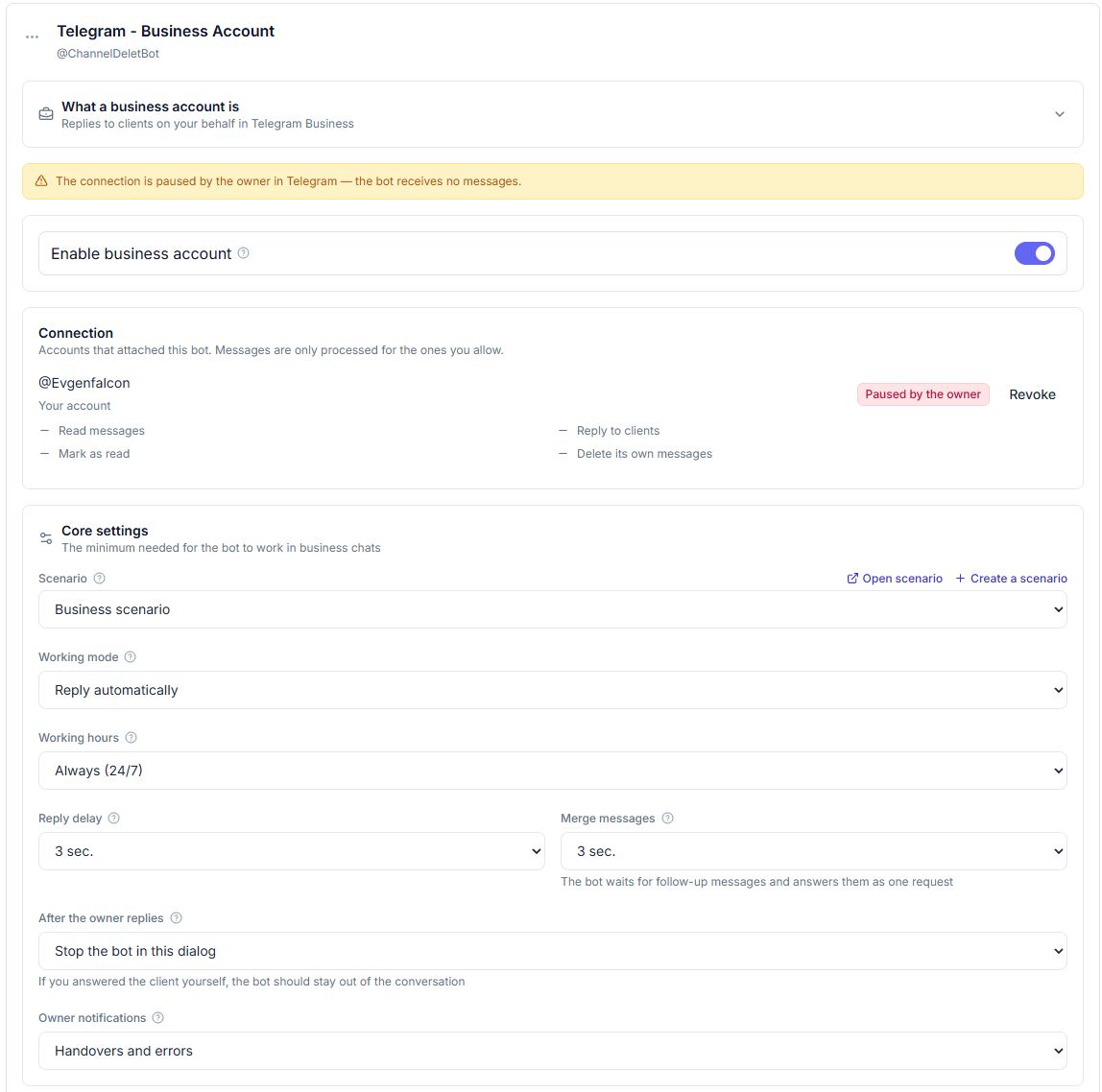
In Botconsole this is the "After the owner replies" setting. Set it to "Stop the bot in this dialog" and your own message silences automation in that chat while marking the conversation as handed over.
11. How to Calculate the Payoff
Promising "40% more sales" is meaningless, because the number depends on your volume. Run it on your own data.
Lost revenue:
Missed inquiries
× average lead-to-order conversion
× average revenue per order
= potential revenue lost
A one-month example:
20 missed inquiries
× 20% conversion
× $200 per order
= $800 in potential revenue lost
Time saved:
Number of conversations
× average manual handling time
= hours of routine work
Fifty conversations at six minutes each is five hours a month spent on "hello" and "how much is it."
The value of a business bot is measured in saved leads, reclaimed owner hours, and response speed, not in messages sent.
12. Security and Control
Connecting a bot to a personal account raises fair questions. Control stays with the owner, and here is what it consists of:
- you choose which chats the bot can access: new or existing conversations, contacts or non-contacts;
- individual chats can be excluded, and the bot never sees private conversations;
- automation can be paused in one dialog without disconnecting the bot;
- the bot holds only the rights you grant: reply to messages, mark as read, delete its own messages;
- access to your profile, gifts, Telegram Stars, and stories is not needed to serve customers, so there is no reason to grant it;
- rights can be revoked at any moment in Telegram's settings.
There is a second side to this, on the service. Technically, any Telegram user could attach your bot to their own account, so in Botconsole an unfamiliar connection lands in an "Awaiting approval" state and processes nothing until you press Allow. Your own account is approved automatically.
13. Limits You Should Know About
An honest list of what a business bot cannot do:
- it works only in private chats the owner has allowed, so groups and channels are out;
- replies are allowed within a 24-hour window after the customer's message, and Telegram does not let you write first;
- one business bot per account;
- the channel is not for cold outreach, which is explicitly against Telegram's rules;
- inline button presses are not processed: buttons render, but the logic has to run on text (link buttons still work);
- AI answer quality depends on your instructions and knowledge base, and without them the bot answers in generalities;
- the scenario must include a manual takeover path.
14. How to Connect a Business Bot
The overall process is seven steps:
- Create a bot in @BotFather or use an existing one.
- Enable Secretary Mode for it:
/mybots→ Bot Settings → Secretary Mode. - Build the conversation scenario.
- Attach the bot to your account: My Profile → Chat Automation → add the bot by
@username. - Choose which chats it can access and grant rights. The "Reply to messages" right is mandatory.
- Test it: message yourself from another account and check the replies.
- Turn the automation on.
The full step-by-step setup with every option is in the documentation: Telegram Business Account.
15. Running a Business Bot in Botconsole
In Botconsole a business account is not a separate channel but the Business Account tab in your Telegram connection settings. What you do there:
- build the scenario visually, without code;
- connect AI and a knowledge base so the bot answers from your own material;
- configure lead capture: questions, variables, tags;
- add integrations: CRM, calendar, spreadsheets, payments, external APIs;
- connect the Telegram account and set working mode, hours, and reply delay;
- see every conversation in one Chats section alongside bot, widget, and other channels;
- jump into any dialog manually, which silences the bot there.
Build a business bot in Botconsole and automate the messages you currently handle by hand.
16. FAQ
What is a Telegram business bot?
A bot connected to a personal account through Secretary Mode. It receives messages from the private chats you allow and replies to customers as the account owner.
Can the customer tell they are talking to a bot?
The reply comes from your account and looks like a normal message, and there is no "this is a bot" label in the chat. Still, do not pass the bot off as a person. If a customer asks directly, an honest answer plus a quick handover works better.
Do I need Telegram Premium?
Telegram's business features, including Chat Automation, are available to account owners with a Telegram Premium subscription. The customer messaging you needs nothing.
Can the owner reply personally?
Yes, at any time, directly in Telegram or from the Chats section. With "Stop the bot in this dialog" enabled, your reply automatically switches automation off in that conversation.
Which messages does the connected bot receive?
Only those arriving in the private chats you allowed in Telegram's settings. Excluded chats, groups, and channels stay invisible to it.
Can I exclude personal contacts?
Yes. Access is configured by lists: new or existing conversations, contacts or non-contacts, plus exclusions for specific chats.
Can the bot message a customer first?
No. It can reply only within 24 hours of the customer's message. Broadcasts and cold outreach are unavailable through this channel and prohibited by Telegram's rules.
How many business bots can I connect?
One per account, which is a Telegram limitation.
Can I connect AI and a knowledge base?
Yes. The bot answers from your own material: price lists, service descriptions, policies. It understands freely worded questions and hands the conversation over when it runs past what it knows.
Can inquiries be saved to a CRM?
Yes. Conversations and contacts land in the Chats section together with your other channels, can carry tags and statuses, and can be pushed to an external CRM through integrations.
How is this different from a regular Telegram bot?
A regular bot is a separate channel with its own account, commands, and buttons. A business bot works inside your existing private conversations, replies as you, and runs on text rather than button presses.
Is it safe to connect a bot to a personal account?
The bot holds exactly the rights you grant, for exactly the chats you select, and those rights are revocable in one tap. Access to your profile, gifts, and Telegram Stars is not required to serve customers, so leave it off.
The Bottom Line
A business bot does not replace the owner or the manager. It takes the first hit: replies instantly, collects the details, handles the routine, and hands a person a customer who is already prepared.
Connect a business bot to your Telegram account in Botconsole and stop losing the leads that arrive at the wrong time.


Terms of material usage
Full or partial copying of materials is allowed only with an active and indexed link to the original source: https://botconsole.net/blog/en/37/telegram-business-bot-how-to-answer-customers-automatically-from-your-own-account