
In this review, we will explore how no-code platforms for Telegram work, what opportunities visual assembly in Botconsole opens up, and how to launch a full-fledged business bot without a single line of Python code.
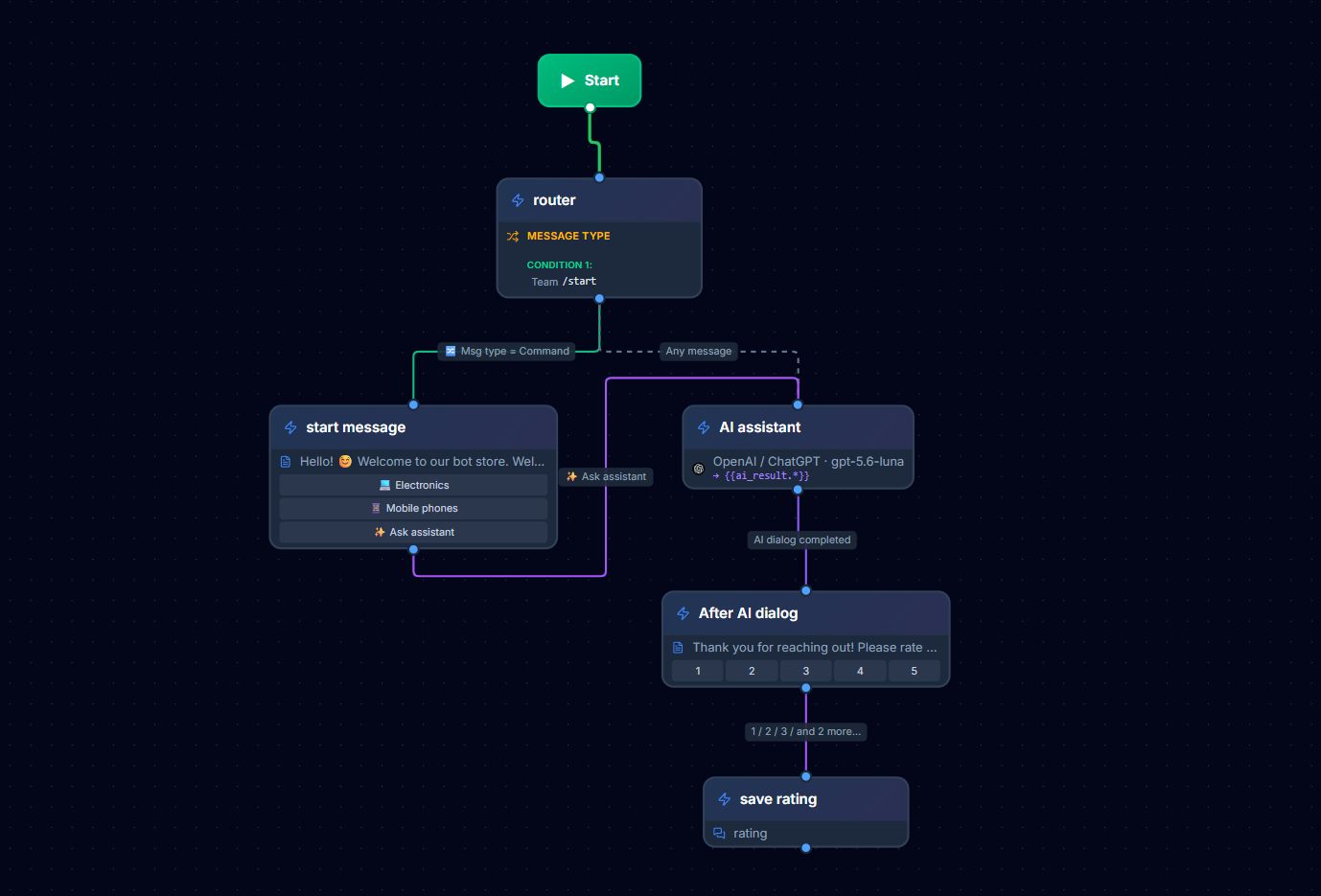
Build a bot in 15 minutes: Create an account in Botconsole and launch your first Telegram bot without code using ready-made templates and neural network integration.
1. Myths about Bot Development: Why Code is No Longer Needed
Not long ago, it was believed that a reliable chatbot for business necessarily required a programmer's services. However, the no-code industry has completely changed the rules of the game:
- Myth 1: You can't create complex logic without code.
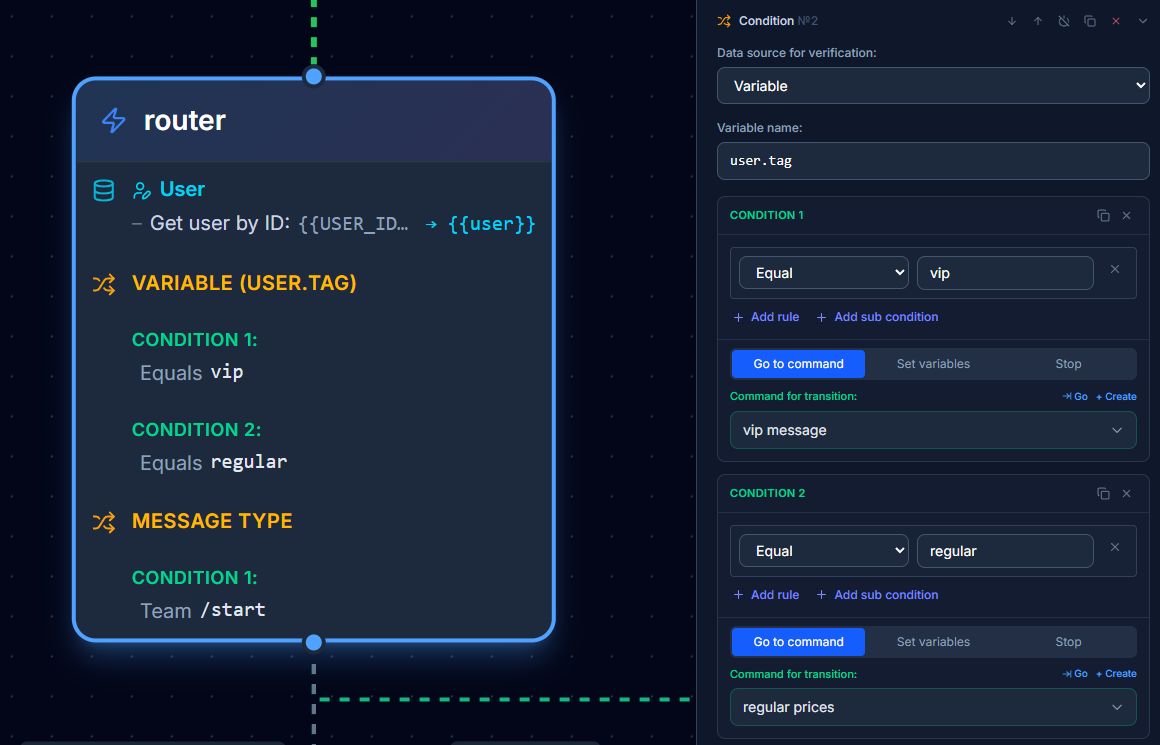
- Reality: The Botconsole builder supports multi-level conditions, mathematical calculations in variables, regular expressions, working with a local database, and sending arbitrary REST API requests.
- Myth 2: No-code bots work slowly.
- Reality: The platform's cloud infrastructure is optimized for millions of requests and processes messenger events in fractions of a second.
- Myth 3: You can't connect artificial intelligence in builders.
- Reality: In Botconsole, the "AI Dialogue" block connects with one click and combines GPT-4o, Claude, and Gemini with your personal knowledge base.
🧩 Use a ready-made free template: ChatGPT bot — Launch an AI-powered Telegram bot without building the flow from scratch • 10 uses
2. Key Features of the No-Code Platform Botconsole
 ┌───────────────────────────────────────────────────────────────────────┐
 │                       Botconsole Features                             │
 ├───────────────────┬───────────────────┬───────────────────────────────┤
 │   Interface       │      Logic        │          Integrations         │
 ├───────────────────┼───────────────────┼───────────────────────────────┤
 │ • Buttons and Menu │ • IF/ELSE Conditions│ • Google Sheets / CRM       │
 │ • Media (photo/pdf)│ • Timers and Drip  │ • Payment acceptance (Stripe/Stars) │
 │ • Data collection forms│ • Databases     │ • OpenAI / Claude / Gemini    │
 │ • Web App / HTML  │ • A/B testing     │ • Webhooks and REST API       │
 └───────────────────┴───────────────────┴───────────────────────────────┘
1. Visual Node-Based Flow Editor
The scenario is built as an understandable map. You always see the entire user journey from the first click to the final purchase or application.
2. Variables and User Properties
Any user response (name, city, selected service) is automatically saved in variables ({{user.city}}, {{order.total}}) and used in subsequent messages or passed to CRM.
3. Auto-Messages and Drip Campaigns
Set up automatic sending of useful content 1 hour, 24 hours, or 3 days after subscription to gently lead the client to purchase.
4. Built-in CRM and Chats Section
All conversations from Telegram go into a single dialogue interface. The manager can intercept the dialogue from the bot at any moment and respond to the client manually.
3. Practical Example: Building a Service Appointment Bot in 4 Steps
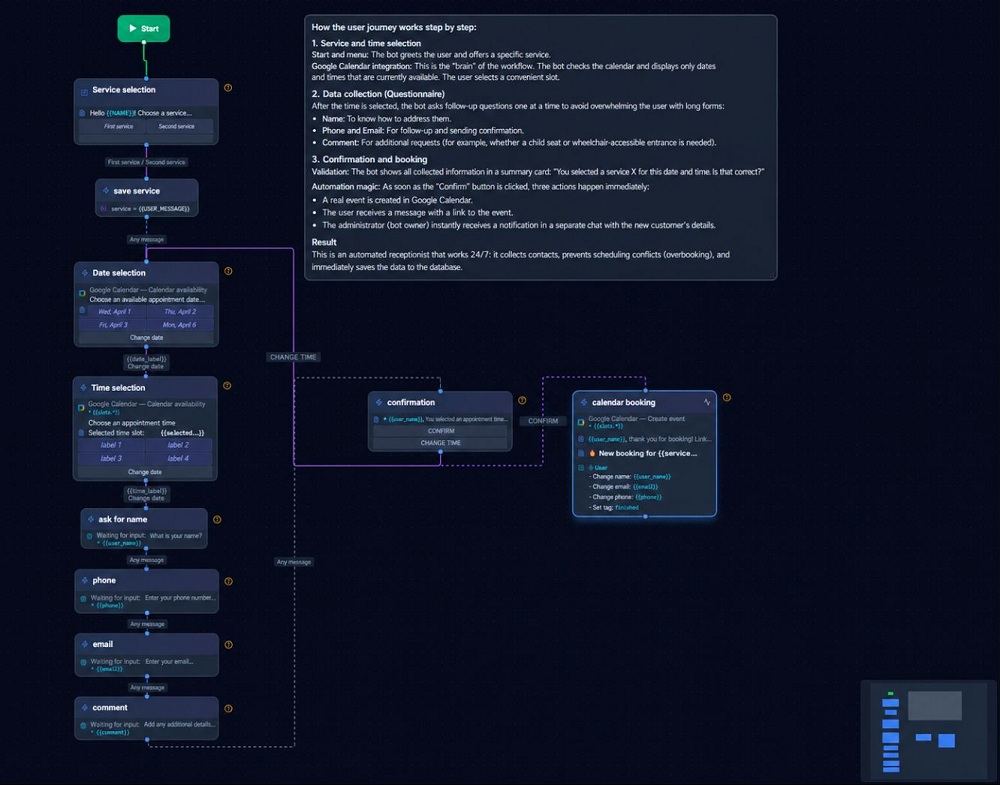
Let's break down how to create a bot for booking services at a beauty salon or for a consultation without programming.
 [Start /start] ──► [Service Selection (Buttons)] ──► [Date Selection (Calendar)]
                                                        │
                                                        ▼
 [CRM / Notification] ◄── [Confirmation] ◄── [Phone Input (Input)]
Step 1. Greeting and Category Selection
Add a "Message" node with inline buttons:
💅 Manicure-> leads to the list of manicure masters.💇♀️ Haircut and Styling-> leads to stylist selection.❓ Ask AI-> connects the "AI Dialogue" block.
Step 2. Request for Date and Time
Use the "Data Input" node or call a web calendar for the client to select a convenient slot.
🧩 Use a ready-made free template: Service booking with service selection — Start accepting service appointments with calendar-synced booking • 24 uses
Step 3. Capturing Phone Number
Add a "Share Contact" button. Telegram will automatically prompt the user to send their number with one click without manual input of digits.
Step 4. Sending Application and Confirmation
- Add an "API Request" or "Notification" node to send data to the Telegram chat of the administrator and Google Sheets.
- Send the client a message: "Thank you, {{user.first_name}}! You are booked for {{order.service}} on {{order.date}} at {{order.time}}."
4. Ready-Made Telegram Bot Templates for Quick Start
To avoid building a scenario from scratch, the Botconsole library offers dozens of ready-made solutions:
💡 Read also: How to test bot scenarios and improve conversions with Botconsole — Find flow issues faster and turn more bot users into customers • 8 mins read
- Quiz Bot for Lead Generation: 4 questions for audience segmentation + calculation of personal cost + contact collection.
- Closed Telegram Channel Bot: automatic payment verification for monthly subscription and generation of one-time invite links.
- Product Catalog Bot: viewing product cards, adding to cart, and placing orders with delivery.
- Support Bot with AI: smart auto-responder based on the company's knowledge base with seamless transfer to an operator.
Frequently Asked Questions (FAQ)
How long does it take to create a bot without programming?
A basic bot-business card with buttons can be assembled in 10–15 minutes. A complex sales funnel with payment acceptance and neural network integration can be launched in 1–2 hours.
Can I transfer a bot from another platform to Botconsole?
Yes. Just reconnect the bot token from @BotFather in the Botconsole settings and reproduce the scenario using ready-made templates.
What happens when the Telegram API is updated?
The Botconsole platform updates automatically. All new Telegram features (Telegram Stars, Web Apps, business bots) become available in the builder without the need to write anything additional.
How can I test the bot before publishing it to clients?
Botconsole has a built-in sandbox mode where you can test all branches of the scenario, conditions, and AI functionality before launching advertising.
Conclusion
The no-code bot builder removes the technical barrier and allows any business to launch sales automation and customer service in just a few minutes.
Try creating a bot without code in Botconsole right now!


Terms of material usage
Full or partial copying of materials is allowed only with an active and indexed link to the original source: https://botconsole.net/blog/en/33/no-code-bot-builder-how-to-create-a-bot-without-code