
Potential clients talk about their needs on Telegram every day: they look for specialists, ask for recommendations, compare companies, complain about their current vendors, and ask what services cost. Those messages get buried fast under regular chatter, ads, and hundreds of new posts.
Finding clients in Telegram groups by hand means reading dozens of chats all day and getting to the right requests before someone else does. Lead Scanner from Botconsole takes that work over: it watches new messages in connected groups, checks them against your conditions, and sends you a notification when a potentially useful request shows up.
Finding buyers is only part of it. The same tool can track local demand, find your competitors' unhappy customers, look for partners and suppliers, watch brand mentions, and show you how your audience describes what it needs.
What Lead Scanner is and how it works
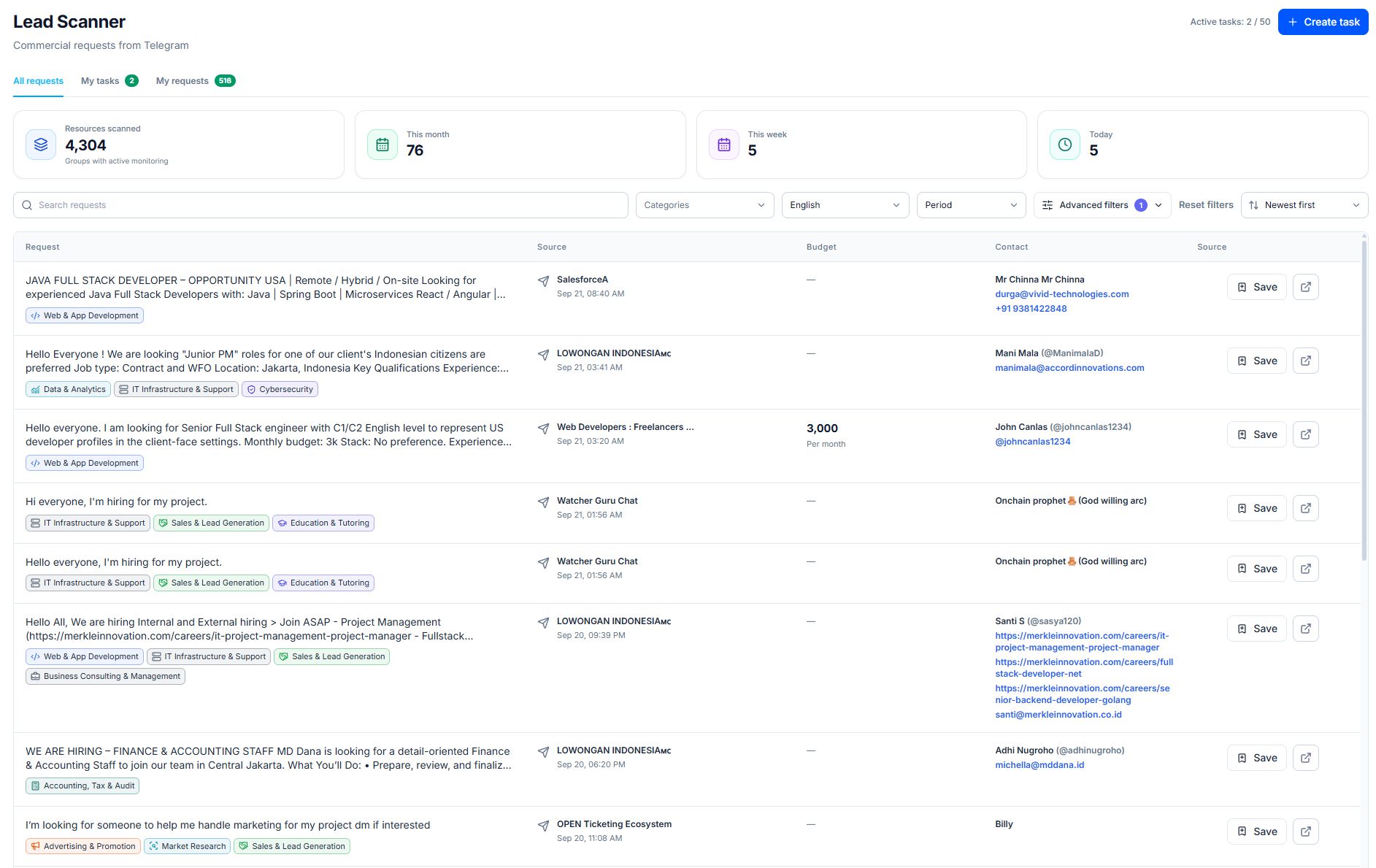
Lead Scanner monitors Telegram groups by keywords, categories, and extra filters. You create a task, describe which messages you care about, and set the search conditions.
A task can include:
- a request category
- keywords and phrases
- stop words to filter out ads and irrelevant messages
- message language
- words that must appear in the group name
- the groups to search in
- notifications by Telegram or email
When the system finds a matching message, you get a notification with the text of the request and its source. You can review the request, accept it, or reject it. Instead of reading chats nonstop, you get a separate feed of potentially useful leads.
Lead Scanner doesn't guarantee a sale and doesn't message anyone on your behalf. It lets you spot a relevant request earlier, evaluate it, and decide for yourself how to respond.
💡 Read also: Telegram Business Bot: How to Answer Customers Automatically From Your Own Account — Respond faster and keep promising leads from slipping away • 16 mins read
1. Catch direct requests for products and services
The most obvious use case: messages from people who already know what they need and are looking for someone to do it or sell it.
For example:
- "Need a designer for a landing page"
- "Can anyone recommend an HVAC installer?"
- "Who can set up a CRM?"
- "Looking for a contractor to build an online store"
- "Where can I order office furniture?"
These people are closer to buying than a random audience seeing your ad: they understand their problem and are actively looking for a solution. All you need to do is see the request in time and reply with something useful.
One general word like "design" or "remodel" won't cut it for finding clients in Telegram groups. It will pull in news, ads, pitches from other providers, and ordinary conversation. Use combinations that signal intent to hire:
- "need a designer"
- "looking for a designer"
- "recommend a designer"
- "who can do design"
- "how much does design cost"
Stop words will cut out messages like "course for designers", "looking for a design job", or "free design tutorial" if they don't fit the task.
🧩 Use a ready-made free template: Telegram Lead generation bot — Turn Telegram inquiries into qualified leads with an AI-powered funnel • New template
2. Find people looking for an alternative to a competitor
Some potential clients never write "I want to buy." Instead they ask for opinions about a specific company, compare a few products, or look for a replacement for what they use now.
Examples:
- "Has anyone used X?"
- "Is there a more convenient alternative to X?"
- "X got too expensive, what should I switch to?"
- "Not happy with X's support"
- "Comparing X and Y, which one is better?"
Competitor monitoring on Telegram shows you the moment when someone hasn't made a final decision yet. That's when you can respectfully offer an alternative: explain how your product differs, share a comparison, or help them pick the right option for their situation.
Don't turn this into a mass outreach campaign. Your message should answer the person's actual question and give them something useful. Instead of an aggressive "switch to us," try: "If those features matter to you, our product has them. Happy to walk you through it using your use case."
In practice, it helps to set up separate tasks for:
- your main competitors' names
- phrases like "alternative", "similar to", "what to replace"
- complaints about price, support, limits, or ease of use
- questions comparing several solutions
3. Find local clients by group name
For a local business, where a message is posted matters as much as what it says. People often skip the city because everyone in a local chat already knows where they are.
Say a message appears in the "Austin Business Owners" group: "Need a designer for a cafe interior." The word "Austin" isn't in the text, but the group name tells you which area the request is from.
Lead Scanner can filter sources by words in the group name. A designer could set:
- key phrases in the message: "need a designer", "looking for a designer", "recommend a designer"
- a word in the group name: "Austin"
After that, you'll only get notifications for matching requests from Austin groups included in the monitoring. The same works with names of cities, neighborhoods, states, apartment complexes, or professional communities.
This works especially well for:
- remodeling and construction
- cleaning and home services
- salons and medical practices
- restaurants, catering, and delivery
- lawyers, real estate agents, and insurance agents
- photographers, emcees, and event planners
- auto repair shops and towing services
The local filter doesn't detect the author's actual location. It selects requests by the source name, so set up your task conditions with that limitation in mind.
💡 Read also: Telegram Sales Bot: How to Build an Automated Sales Funnel and Scale Lead Generation — Build a sales funnel that turns Telegram leads into customers • 9 mins read
4. Respond to urgent needs
Some requests matter more because the person has very little time to decide. For example:
- "Need an electrician ASAP"
- "Who can fix an AC unit today?"
- "Need equipment delivered by tomorrow"
- "Looking for a photographer for an event this Saturday"
In these cases, response speed usually beats a long comparison of quotes. Telegram keyword alerts let you spot the message quickly, even in an active group with hundreds of posts a day.
You can create a separate task with words like "urgent", "ASAP", "today", "by tomorrow" and combine them with phrases from your niche. That way, urgent requests don't get mixed in with regular ones and you can handle them first.
5. Spot indirect signals of future demand
A need isn't always phrased as a request. Sometimes someone just mentions an event that will most likely require products or services down the line.
For example:
- "Opening a salon"
- "Moving to a new office"
- "Launching an online store"
- "Planning a conference"
- "Starting to build a house"
- "Expanding to Europe"
A post about opening a restaurant could interest suppliers of equipment, furniture, and food, interior designers, marketers, web developers, CRM integrators, and delivery services. The person isn't looking for each vendor individually yet, but the need is already visible.
For this scenario, set up a separate task with phrases that describe the event, and keep it apart from hot leads. Indirect signals need a manual review and a more careful first touch.
6. Find suppliers, contractors, and partners
Sales isn't the only use. The same approach works for finding what your business needs itself:
- manufacturers and wholesale suppliers
- contractors to hand off part of a project
- logistics and warehousing companies
- agencies to team up with on orders
- specialists with rare expertise
- partners for regional representation
For example, a digital agency could track "looking for an SEO contractor", "need a developer for subcontract work", or "who can take over our ad setup". A manufacturer could catch "looking for a packaging supplier" or "need contract manufacturing".
This closes operational gaps faster and brings in partners from outside your usual network.
7. Find employees and project specialists
Professional Telegram communities regularly post job openings and one-off projects. A separate task can search for specialists by role, skills, work format, and location.
For example:
- "hiring a Laravel developer"
- "need a marketer for a project"
- "designer needed, on-site"
- "looking for a bilingual sales manager"
It also works the other way around: specialists can use Lead Scanner to find jobs and gigs. Phrases like "hiring", "looking for", "need a specialist" combined with a profession or technology will do the job.
Keep job postings in a separate task so they don't mix with client requests.
8. Track mentions of your company and product
You can monitor your company name, product, domain, or the founder's name if it's distinctive. That makes it easier to catch:
- questions from potential clients
- reviews and recommendations
- complaints about the product or support
- incorrect information about the company
- accounts impersonating your official one
- discussions about new features
A quick, calm reply to a public question can head off a reputation problem or turn a discussion into a sale. Answer openly and don't try to bury fair criticism.
Add common spelling variations, abbreviations, and likely typos to your brand name. If the name is also an ordinary word, you'll need extra topical conditions and stop words.
9. Study the market and how clients actually phrase things
Topical groups show how your audience describes its problems without the prompts of a lead form. Those phrasings are useful for marketing and product development.
Found requests show:
- which problems come up most often
- which words people use to describe a need
- which features they consider must-haves
- why they leave competitors
- which questions they ask before buying
- which objections hold them back
- which cities and niches show demand
You can use this in landing pages, ads, help centers, articles, proposals, and new product features.
For example, if clients keep asking "can I set it up without a developer," that exact phrasing belongs on your website and in onboarding. If people often ask about flat pricing, you may need a clearer package plan.
10. Test demand in new niches and regions
Before running ads in a new city or vertical, you can look at real requests in Telegram groups first. To do that, create several identical tasks with different words in the group name or different categories.
For example, an automation company could separately track requests from Austin, Denver, and Phoenix. After a while it becomes clear where people search for CRMs, chatbots, integrations, or sales automation more often.
These observations don't replace proper market research: the number of available groups and how active they are varies. But they add extra signal and let you test a hypothesis before spending big on promotion.
How to set up your first task
To get value from Telegram group keyword monitoring, start with one specific goal.
Step 1. Decide on the signal type
Choose exactly what you want to find:
- direct client requests
- competitor mentions
- urgent requests
- local demand
- job postings
- partners or suppliers
- mentions of your own brand
Don't combine all scenarios in one task. Each needs its own keywords, stop words, and way of handling results.
Step 2. Collect intent phrases
Beyond service names, add words that show what the person intends to do:
- "looking for"
- "need"
- "recommend"
- "who can do"
- "want to order"
- "how much does it cost"
- "where do I go for"
Combine them with the service, product, or the client's problem. For HVAC, besides "AC installation", try "AC not cooling", "AC broke", or "need an HVAC tech".
Step 3. Add stop words
Stop words filter out obviously irrelevant messages. Depending on the goal, these might be "course", "training", "hiring", "resume", "free", "selling".
Don't pile on restrictions right away. Look at real results first, then cut the noise that keeps repeating.
Step 4. Set up a group name filter
If your business works in a specific region or niche, add the name of the city, state, neighborhood, or topic. This pulls in messages from more relevant communities, even when the word isn't in the message itself.
Step 5. Turn on notifications and prepare a reply
Pick a notification channel: Telegram or email. Prepare a short template for the first reply in advance, but adapt it to the context of each request.
A good reply:
- shows you read the original message
- briefly explains how you can help
- includes one relevant example or proof of experience
- suggests a simple next step
- doesn't look like a mass message
Task examples for different types of business
| Task | Key phrases | Group name filter | Possible stop words |
|---|---|---|---|
| Local repairs | need a handyman, who can fix, urgent repair | Austin, Round Rock | hiring, training |
| Web development | need a website, looking for a developer, turnkey online store | business, startups | course, resume, looking for a job |
| Dental practice | recommend a dentist, toothache, where to get an implant | city or neighborhood name | hiring, training |
| B2B automation | need a CRM, sales automation, set up a chatbot | entrepreneurs, business | course, webinar, resume |
| Competitor alternative | competitor name, alternative, what to replace, too expensive | no restriction or a specific niche | job openings, news |
| Supplier search | looking for a supplier, wholesale purchase, contract manufacturing | manufacturing, wholesale | retail, training |
How to measure results
The total number of messages found doesn't say much. Judge Lead Scanner by what happens after the notification.
Useful metrics:
- number of relevant requests
- share of accepted requests
- response time
- number of conversations started
- number of qualified leads
- meetings, quotes, and sales
- best-performing keywords and groups
If you get lots of notifications but few good requests, narrow the conditions and add stop words. If you get almost nothing, expand your phrases, check the selected groups, and remove restrictions that are too strict.
The main thing: respond to the signal, don't spam
Lead Scanner shows you the moment a need appears. What you do with that signal is up to you, and that's what determines the result.
Reply only to fresh, genuinely relevant messages, follow the group's rules, and keep the context in mind. A useful, timely reply beats a generic sales pitch.
Used that way, Lead Scanner works as an early warning system for demand, not a spam tool: you learn about new requests and competitors' customer problems sooner, instead of losing them in the flood of messages.
Start finding opportunities on Telegram
If your clients, partners, or contractors are on Telegram, some of the requests that matter to you are already appearing in topical and local groups. Lead Scanner picks them out from thousands of messages and sends notifications only for the tasks you've set up.
Create separate tasks for direct demand, local requests, and competitor mentions, try different phrasings, and refine your filters over time based on what you find.
Lead Scanner is available in Botconsole starting from the START plan.


Terms of material usage
Full or partial copying of materials is allowed only with an active and indexed link to the original source: https://botconsole.net/blog/en/39/how-to-find-clients-on-telegram-lead-scanner-for-business