In this guide, you will learn the exact architecture of a high-converting Telegram sales funnel, how to automate lead qualification without sales burnout, and how to build your own sales bot in Botconsole without writing code.
💡 Read also: No-Code Bot Builder: How to Create a Bot Without Code — Learn how to build powerful bots visually—no coding skills required • 6 mins read
Turn ad traffic into paying customers: Build an automated Telegram sales bot with instant qualification, drip sequences, and Stripe/Telegram Stars checkout in Botconsole — free forever, no coding required.
1. Why Telegram Sales Outperform Traditional Landing Pages
Driving paid traffic to standard web landing pages rarely yields more than a 2–5% conversion rate. That means 95% or more of your ad clicks bounce without leaving an email or phone number. Re-engaging those lost visitors requires expensive retargeting campaigns with diminishing returns.
A Telegram sales funnel fundamentally alters this dynamic:
 Traditional Landing Page:
 Paid Ads (Meta/Google) ──► Landing Page ──► 95-97% bounce anonymously ──► Sunk Ad Spend
                                                    │
                                                    ▼ 3% fill contact form

 Telegram Sales Funnel:
 Paid Ads / Social ──► Bot: Click /start ──► 100% of users become persistent subscribers
                                                    │
                                                    ▼
                     [Automated Nurture + Qualification Quiz + In-App Checkout]
Key Performance Comparison:
| Metric | Traditional Web Landing Page | Telegram Sales Bot |
|---|---|---|
| First-Touch Conversion | 2–5% (form submission) | 40–70% (clicking /start) |
| Open Rates | 15–22% (email marketing) | 80–90% (push notifications in Telegram) |
| Click-Through Rate (CTR) | 2–4% inside email links | 20–35% on inline interactive buttons |
| Re-engagement Cost | High (retargeting pixels & rising CPMs) | Free, unlimited follow-ups via automated drip sequences |
| Speed to Lead (First Response) | 15–60 minutes (or next business day) | Under 1 second (instant AI / automated response) |
In the US market, Speed to Lead is a major competitive advantage. Research consistently shows that contacting an inbound lead within five minutes makes them up to 21 times more likely to enter the sales pipeline compared to waiting 30 minutes. An automated bot responds instantly, while the prospect's intent is at its peak.
Furthermore, with email open rates challenged by Gmail's Promotions tab and SMS subject to strict 10DLC carrier filtering and per-message fees, Telegram gives businesses a direct, push-enabled line of communication with zero per-message carrier costs.
2. The 5-Stage High-Converting Telegram Sales Funnel
To convert traffic into revenue rather than just generating casual chats, your bot scenario needs a structured, 5-stage progression:
 ┌──────────────────────┐
 │ 1. Capture           │ ──► Instant lead magnet delivery / introductory incentive
 └──────────┬───────────┘
            │
            ▼
 ┌──────────────────────┐
 │ 2. Segmentation      │ ──► 2-3 question interactive quiz to qualify intent & budget
 └──────────┬───────────┘
            │
            ▼
 ┌──────────────────────┐
 │ 3. Automated Nurture │ ──► Drip sequence: case studies, video proof, and ROI examples
 └──────────┬───────────┘
            │
            ▼
 ┌──────────────────────┐
 │ 4. Core Offer        │ ──► Tailored offer, limited-time incentive, or 1-click checkout
 └──────────┬───────────┘
            │
            ▼
 ┌──────────────────────┐
 │ 5. Close / Handoff   │ ──► AI objection handling OR seamless escalation to human sales rep
 └──────────┬───────────┘
Stage 1: Capture and Instant Value Delivery
Do not open with an essay about your company. Mobile users want immediate value. Deliver whatever the ad or referral link promised right away: an actionable PDF checklist, an exclusive discount code, access to a mini-course, or a product calculator.
Stage 2: Interactive Qualification (The Quiz Funnel)
Traditional multi-field web forms create friction. Instead, use inline buttons to qualify leads conversationally:
- What is your biggest operational bottleneck right now?
- What is your monthly budget or team size?
- Are you looking for a personal setup or an enterprise solution?
Every answer automatically saves to the contact's profile as a variable and a tag (for example, tag: enterprise, tag: high_budget, tag: ecommerce). This lets you deliver personalized offers to each segment.
🧩 Use a ready-made free template: Telegram Lead generation bot — Launch a ready-made AI lead qualification funnel in minutes • New template
Stage 3: Automated Drip Nurture (Auto Messages)
If a prospect does not purchase on their first session, Botconsole's Auto Messages node triggers a timed drip campaign to build trust:
- +2 hours: A case study highlighting a customer who solved the exact problem selected in Stage 2.
- +24 hours: A 60-second video demo showing your product or workflow in action.
- +48 hours: A time-sensitive promotional discount, bonus deliverable, or direct link to book a discovery call via Google Calendar or Calendly.
Stage 4: In-App Checkout in 1 Click
Bouncing mobile buyers to an external website checkout causes cart abandonment. With Botconsole, you can accept payments directly inside Telegram via Stripe (supporting Credit Cards, Apple Pay, and Google Pay) or Telegram Stars for digital products.
💡 Read also: How to Connect Stripe for Accepting Payments in Telegram Bots: Complete Guide and Secrets of Successful Moderation — Set up Stripe payments in Telegram and turn chats into checkouts • 7 mins read
Stage 5: AI Consultation & Live Sales Rep Handoff
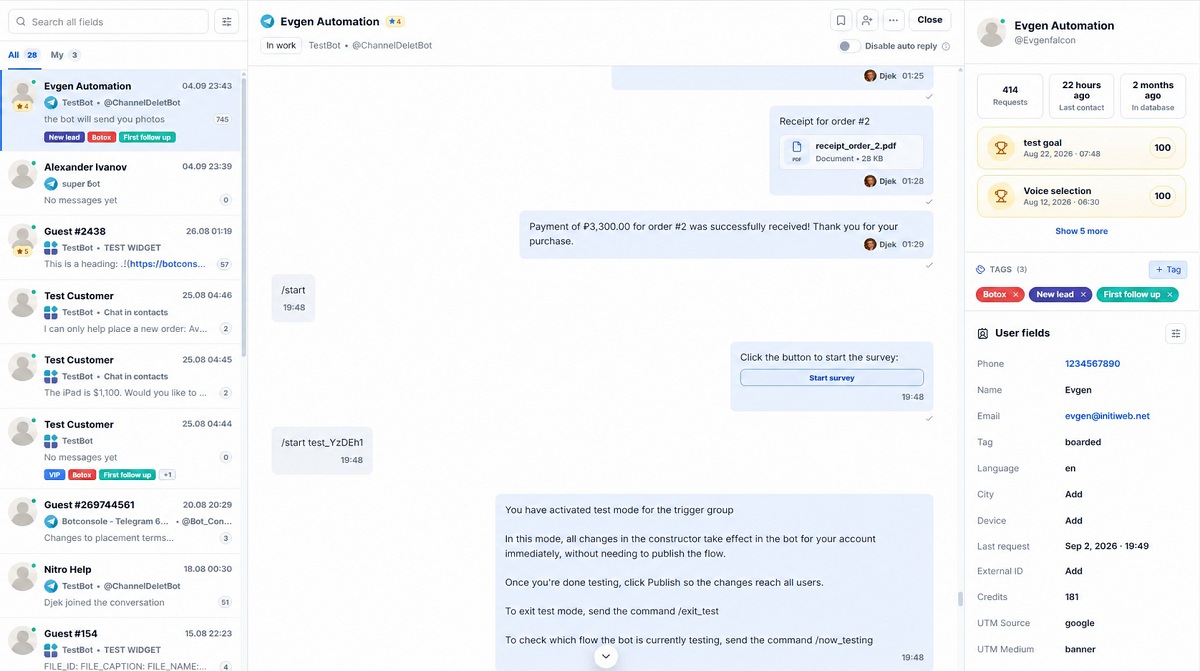
When prospects raise specific questions ("Do you integrate with HubSpot?", "What is your refund policy?"), the AI Dialog node answers instantly using your uploaded knowledge base. If a high-value enterprise prospect requests a custom proposal or a human call, the bot immediately alerts your team and opens the conversation in Botconsole's unified Chats inbox.
3. Step-by-Step: Setting Up a Sales Bot in Botconsole
Step 1. Create the Scenario and Configure UTM Tracking
- Inside your Botconsole dashboard, navigate to Scenarios and create a new bot flow.
- In the initial entry node, configure first-touch UTM parameter capture (
utm_source,utm_campaign,utm_medium,utm_content). When running ads on Meta, Google, or TikTok, your bot captures these parameters to track which campaign produced each customer.
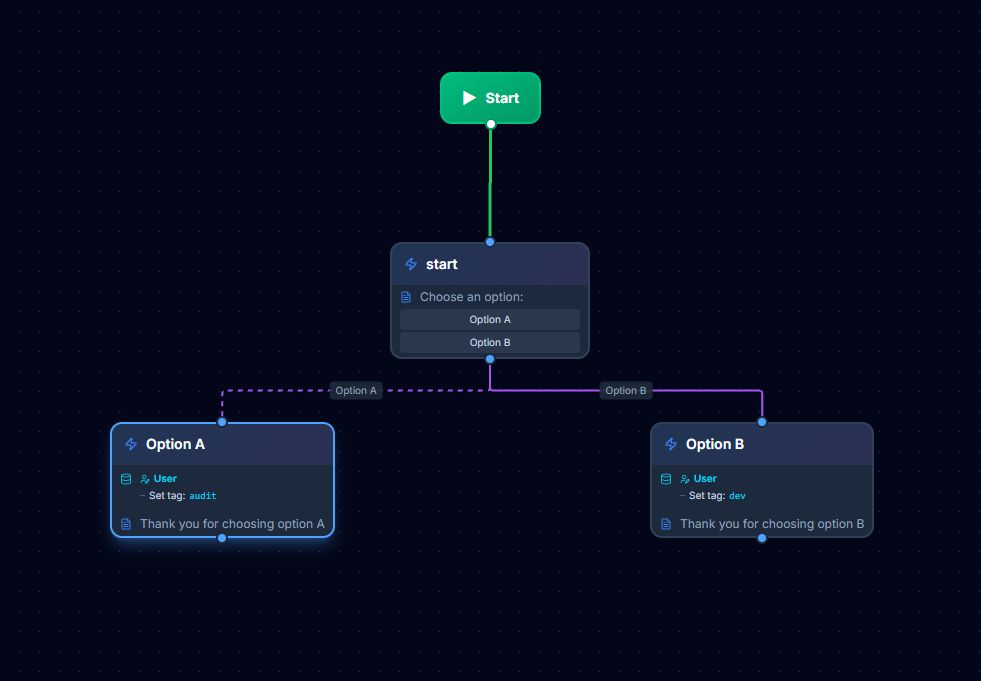
Step 2. Build the Qualification Quiz with Button Tagging
- Add a Message node with inline buttons for lead qualification.
- In the button settings, attach a Add Tag action:
- Button "Need a custom agency solution" ➔
Add tag: agency - Button "Looking for a SaaS subscription" ➔
Add tag: saas
- Button "Need a custom agency solution" ➔
- Direct each button branch to a tailored follow-up message matching the user's specific need.
Step 3. Connect the "AI Dialog" Node for Objection Handling
- Drag the AI Dialog node onto the canvas.
- Select your preferred model provider (such as OpenAI GPT-4o-mini, Anthropic Claude 3.5 Sonnet, or Google Gemini 2.0 Flash).
- Connect your Knowledge Base (upload your pricing sheets, FAQs, and product manuals via RAG).
- Set a concise system prompt that instructs the AI to handle objections politely, answer based on verified facts, and guide the prospect toward booking a call or checking out.
Step 4. Add Payment & Fulfillment Nodes
- Add a Payment node to the canvas.
- Select your gateway (Stripe or Telegram Stars), set the price in USD, and provide an item description.
- Configure the Success Node branch: automatically deliver digital files, send private community invite links, or push the deal data to your CRM.
- Configure the Error Node branch: offer alternative payment options or connect the buyer with support.
4. Common Pitfalls That Kill Bot Conversions
- Walls of text: Mobile users scan in seconds. Keep individual messages under 3–4 sentences or use clean bulleted lists.
- Missing clear next steps: Always provide 1–3 inline button choices so users never have to guess what to type next.
- Daily promotional blasts: Excessive broadcasts cause users to mute or block your bot. Space your nurture sequence 12 to 48 hours apart and lead with educational value before pitching.
- Slow human escalation: When a qualified B2B lead asks to speak with a human, your sales rep should respond within five minutes. Use Botconsole's real-time Telegram and email alerts to ensure your team never misses an active buyer.
- Ignoring attribution: Running paid traffic without UTM tracking makes it impossible to know your return on ad spend (ROAS). Use Botconsole's deep-link tracking for every marketing channel.
Frequently Asked Questions (FAQ)
Can I sync leads from Telegram into my existing CRM?
Yes. Botconsole syncs lead contacts, conversation history, and deal data directly with HubSpot, Salesforce, Pipedrive, Google Sheets, and any custom endpoint via Webhooks or Make/Zapier.
Is accepting payments inside Telegram secure and compliant?
Yes. Botconsole uses certified payment gateways like Stripe, which comply with PCI DSS Level 1, SOC 2, CCPA, and GDPR. Sensitive cardholder details are tokenized and processed securely by Stripe; raw card numbers are never stored in the bot or database.
What happens if a user stops or blocks the bot?
Botconsole provides funnel analytics showing user retention and drop-off rates at each step. If drop-offs spike after a particular message, you can adjust the timing or refine the copy to keep engagement high.
How do I track which ad campaigns generate the highest ROAS?
You can generate unique deep links for each ad creative (t.me/YourBotName?start=meta_spring_sale). Botconsole automatically records the campaign source and displays conversion metrics per link, allowing you to calculate exact CAC and ROAS for every ad set.
Conclusion
A dedicated Telegram sales bot turns conversational traffic into an automated pipeline of qualified leads, booked calls, and completed checkouts around the clock.
Ready to scale your conversational sales? Build and launch your Telegram sales bot with Botconsole today — start free with no code required.


Terms of material usage
Full or partial copying of materials is allowed only with an active and indexed link to the original source: https://botconsole.net/blog/en/35/telegram-sales-bot-how-to-build-an-automated-sales-funnel-and-scale-lead-generation