Botconsole provides a robust, no-code payment ecosystem that allows bot creators to connect international and local payment gateways, issue one-time payment links, run recurring subscriptions, and automate customer journeys based on payment outcomes.
This article outlines Botconsole's payment capabilities, details how to set up payment and subscription links in the visual bot builder, highlights key differences between single payments and subscriptions, and explains every configuration setting in plain, non-technical terms.
1. Gateway Setup & Provider Capabilities
Before adding payment links to your bot's conversational flows, you connect and configure your preferred payment gateways in Botconsole.
Connecting Payment Providers
Botconsole supports a wide variety of payment gateways catering to global and regional markets—including Stripe, PayPal, T-Bank (Tinkoff), YooKassa, LemonSqueezy, FreeKassa, Cryptomus, CryptoBot, Robokassa, Payeer, and Telegram Stars / Telegram Invoices.
For each connected gateway, bot owners simply input their credentials (such as API keys, secret keys, public keys, or shop IDs/wallets) in the bot settings. Key credentials are securely stored per bot.
Sandbox & Test Payments Mode
Testing checkout flows before accepting real customer funds is essential. Botconsole includes a Test Mode (Sandbox) toggle for connected payment providers. When enabled:
- You can test button interactions, payment link generation, and automated flow transitions using sandbox payment details.
- Real funds are not charged, allowing you to thoroughly test user onboarding, private channel grants, and error handles.
Subscription Compatibility (allow_recurrent)
Not all payment gateways support automated recurring charges. For instance, basic cryptocurrency links or simple one-off invoice providers only support single transactions, whereas Stripe, PayPal, LemonSqueezy, and T-Bank support recurring card binding or subscription management.
Botconsole automatically validates gateway capabilities:
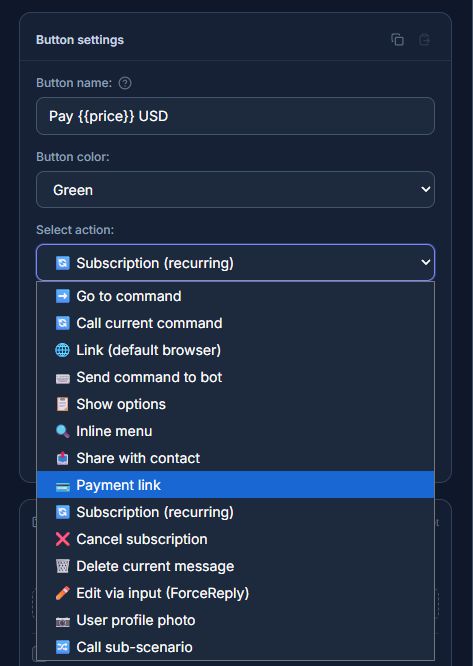
- When configuring a One-Time Payment Link, all active payment providers are available.
- When configuring a Subscription Link, Botconsole filters the list to display only providers that support recurrent payments (
allow_recurrent). This prevents misconfigurations and ensures customers never experience failed recurring checkouts.
2. One-Time Payment Links (payment_link)
One-time payment links are designed for single, non-recurring transactions where a customer pays once for a product or service.
Typical Use Cases
- Selling e-books, guides, software templates, or downloadable files.
- Single event tickets or webinar access.
- One-off consultation or service fees.
- Physical product purchases or custom order deposits.
- Account balance top-ups.
Builder Settings & Configuration
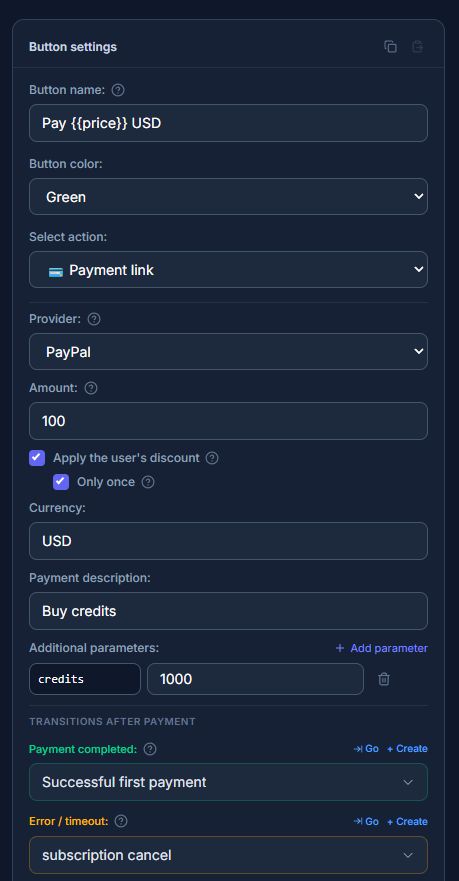
In the Botconsole visual flow builder, adding a payment button with the payment_link action opens an intuitive settings panel:
| Setting | What It Is | Why You Need It |
|---|---|---|
| Payment Provider | Selects the connected payment gateway for this button. | Allows you to direct different products to different merchant accounts or gateways (e.g., Stripe for international cards, YooKassa for local payments). |
| Amount | The charge amount. Supports fixed numbers (e.g., 99.00) or dynamic variables (e.g., {{order_total}}). |
Enables dynamic pricing based on user choices, selected quantities, or calculated shopping cart totals. |
| Currency | The target transaction currency (e.g., USD, EUR, RUB, USDT). | Specifies the currency passed to the payment gateway checkout page. |
| Description | Item description displayed on the gateway's checkout page. | Informs the customer what they are paying for on the payment gateway screen. |
| Apply Personal Discount | Toggle to enable user-specific loyalty discounts. | Automatically recalculates the payment amount based on discounts assigned to individual bot users. |
| Single-Use Discount | Applies the discount only to the current transaction. | Prevents discounts from automatically applying to future purchases if designed as a one-time promo. |
| Success Node | The conversational block/node executed after payment confirmation. | Instantly sends the purchased product, issues access keys, or triggers automated order fulfillment. |
| Error Node | The conversational block/node executed if payment fails or is cancelled. | Gently prompts the customer to try another payment method or offers support assistance. |
| Variable Prefix | Name of the variable container (defaults to payment). |
Controls how payment data is stored in the bot session (e.g., {{payment.order_id}}, {{payment.amount}}). |
| Custom Payload / Parameters | Key-value pairs attached to the transaction (e.g., sku, promo_code). |
Passes custom tracking metadata through the gateway and back into your bot flows for order tracking. |
Automated Dynamic Variables
Once a payment succeeds, Botconsole populates variables into the user's bot session for downstream nodes:
{{payment.id}}— Payment record ID.{{payment.order_id}}— Unique order tracking number.{{payment.amount}}&{{payment.currency}}— Final paid amount and currency.{{payment.status}}— Payment status (paid,failed, etc.).{{payment.paid_at}}— Timestamp of confirmation.{{payment.payload.KEY}}— Custom metadata passed in payment parameters.
3. Subscription & Recurring Payment Links (subscribe)
Subscription links allow bot creators to build recurring revenue models by automatically billing customers at fixed time intervals.
Typical Use Cases
- Paid VIP Telegram channels or private groups (monthly or annual access).
- Recurring content memberships, newsletters, or trading signals.
- SaaS bot subscriptions or premium feature unlocks.
- Maintenance retainers or recurring service plans.
Key Differences: One-Time vs. Subscription Links
| Feature | One-Time Payment Link (payment_link) |
Subscription Link (subscribe) |
|---|---|---|
| Billing Frequency | Charged once. | Automatically billed on a recurring interval (e.g., every 30 days). |
| Gateway Support | Compatible with all active payment providers. | Requires gateways with recurring/card-binding support (allow_recurrent). |
| Lifecycle Nodes | 2 Nodes: Success and Error. | 5 Nodes: Initial Success, Initial Error, Renewal Success, Renewal Failure, Cancellation. |
| Customer Retention | Ends upon order delivery. | Continuously manages active access, retry attempts, and automatic access revocation on non-payment. |
| Discounts | Applied to the single transaction. | Can apply to initial payment while keeping regular price for subsequent renewals. |
Builder Settings & Configuration
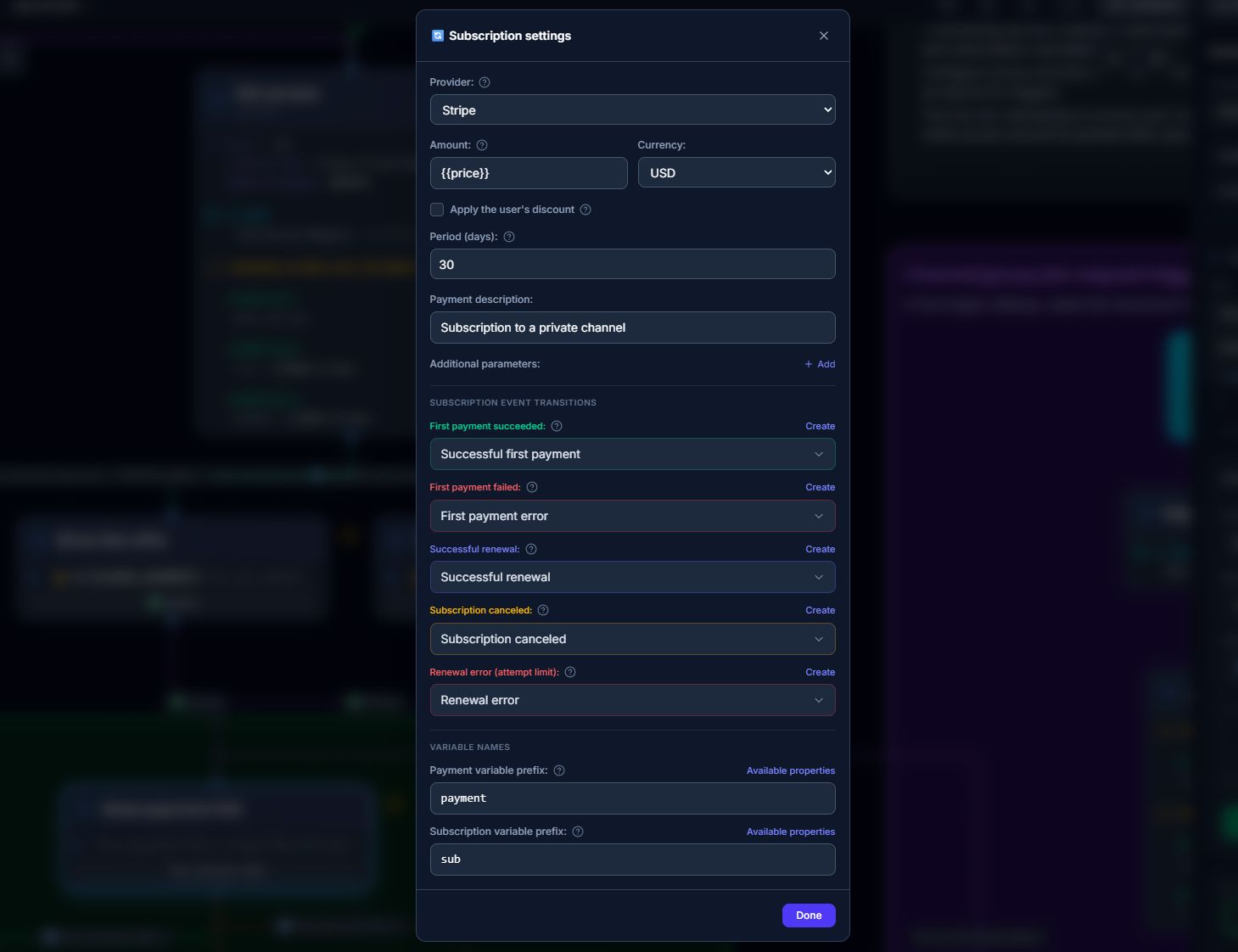
When configuring a button with the subscribe action type:
| Setting | What It Is | Why You Need It |
|---|---|---|
| Subscription Provider | Selects a subscription-capable payment gateway. | Guarantees that the gateway supports card saving and automated recurring billing. |
| Recurring Amount | The base price charged at each renewal interval. | Sets the predictable recurring price for your service. |
| Currency | Billing currency. | Determines the currency for initial and recurring charges. |
| Billing Period (Days) | Interval between recurring charges (e.g., 30 days for monthly, 7 days for weekly). | Defines subscription duration and automatically calculates next renewal dates. |
| First-Charge Discount | Optional discount applied only to the first billing cycle. | Enables introductory trial pricing or promotional first-month discounts. |
| Maximum Retry Attempts | Number of retry attempts on failed renewals (e.g., 3 attempts). | Gives customers a grace period to fund their card before revoking access. |
| Success Node | Node launched after the initial first payment succeeds. | Welcomes new subscribers, grants private channel invite links, or delivers initial onboarding. |
| Error Node | Node launched if the initial card binding/payment fails. | Notifies the user that card authorization was declined. |
| Renew Node | Node launched on every successful automatic renewal. | Sends a renewal receipt and extends channel membership without user intervention. |
| Fail Renew Node | Node launched when all retry attempts fail. | Automatically revokes channel access, removes the user from VIP groups, and sends an access expired notification. |
| Cancel Node | Node launched when a subscription is cancelled. | Confirms cancellation and informs the user when their current paid period will end. |
| Variable Prefixes | Variable containers for payment (payment) and subscription state (sub). |
Supplies subscription metadata (e.g., {{sub.status}}, {{sub.next_charge_at}}) to bot nodes. |
4. In-Bot Subscription Management & Cancellation (cancel_subscription)
Giving users an easy way to manage and cancel their subscriptions builds trust and ensures compliance with global subscription regulations.
Botconsole features a built-in button action type: cancel_subscription.
How Cancellation Works
Botconsole handles cancellation seamlessly according to the payment gateway's architecture:
- Internal Passive Cancellation: For gateways where Botconsole manages scheduled recurring charges, cancelling immediately marks the subscription status as cancelled so no future charges occur.
- API Active Cancellation: For gateways like Stripe or LemonSqueezy that manage subscription schedules on their end, Botconsole calls the provider's API to stop future billing automatically.
- Self-Service Customer Portal: For gateways requiring external portal management, Botconsole generates a direct, personalized link to the customer's billing dashboard.
Once cancelled, Botconsole automatically triggers the configured Cancel Node, updating subscription variables in real time.
5. Instant Notifications & Error Prevention
System reliability and clear communication ensure you never miss a sale or suffer silent configuration errors.
Real-Time Bot Owner Notifications
Whenever a payment or subscription charge succeeds, Botconsole notifies the bot owner across three channels:
- In-App Notification Bell: Accessible inside the Botconsole dashboard.
- Telegram Notification: Direct alert sent to the bot owner's personal Telegram account.
- Email Alert: Sent to the registered account email.
Notifications detail the bot name, buyer username/ID, item description, amount, currency, and subscription cycle status.
Proactive Error Alerts
If a customer clicks a payment link but the link fails to generate (for example, due to expired API credentials or gateway downtime), Botconsole instantly sends a alert to the bot owner via Telegram:
⚠️ Payment Link Generation Error
Bot: VIP Traders Bot
Provider: Stripe
Button: Upgrade to VIP ($99)
Error: Invalid secret key
[🔧 Open Builder]
This allows bot owners to resolve gateway credential issues immediately without missing potential revenue.
6. Database Block Integration for Payment Workflows
For complex bot scenarios, Botconsole includes a Database Block with a dedicated payment data source. Bot creators can query and inspect payment history within the bot flow without code:
- Get Payment by ID / Order ID: Verifies specific transactions during user support requests.
- Get Customer Payments: Retrieves all past payments made by the current user to display transaction history.
- Get All Bot Payments: Queries payments across the bot with custom filters (e.g., date ranges, payment status, minimum amounts) to generate custom reports or grant multi-tier rewards.
Summary
Botconsole transforms payment processing in Telegram into a visual, drag-and-drop experience:
- Flexibility: Connect multiple international and local payment gateways per bot with sandbox testing.
- Versatility: Accept one-time payments or launch automated recurring subscriptions with flexible billing periods.
- Automation: Direct customers through customized bot flows based on initial payments, renewals, failures, and cancellations.
- Reliability: Instant multi-channel sales notifications and automatic error diagnostic alerts.
With Botconsole, monetizing your Telegram presence is simple, reliable, and completely automated.


Terms of material usage
Full or partial copying of materials is allowed only with an active and indexed link to the original source: https://botconsole.net/blog/en/18/monetizing-telegram-bots-with-botconsole-the-complete-guide-to-one-time-payments-and-automated-subscriptions